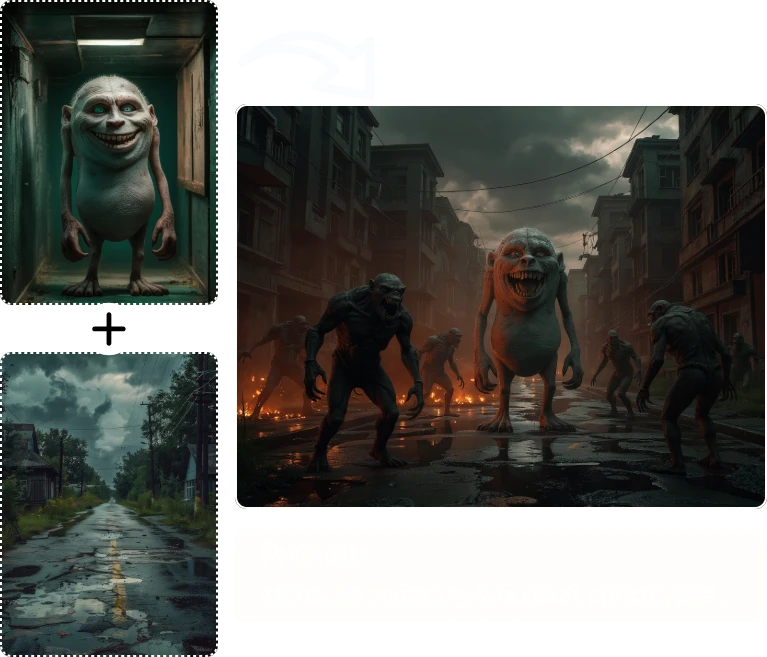
Combining photos is easy if you only need a grid. Creating one coherent scene from several references is a different task. The light must feel compatible, the main subject must remain readable, and the result should not look like unrelated pictures competing for attention.
Quick answer: Begin with two complementary images, assign each a clear role, describe the intended composition, and review the result for subject fidelity and lighting. Add more references only when they contribute something specific.
Disclosure: AI Image Blender is our product. Interface details were checked on September 18, 2026. Prompt examples below are suggested starting points, not claims about measured or guaranteed results.
AI image blending uses multiple visual references to create a new composition. Depending on the system and prompt, the result may reinterpret subjects, backgrounds, colors, and style. It is not necessarily a literal layering of the original pixels.
This makes it useful for concept art and visual exploration, but different from precise compositing. If a packaging label, a face, or a product shape must stay exact, a layer-based editor gives you a different kind of control. A convincing generated image should not automatically be treated as a faithful photograph.
Artistic-fusion example from the product website. This is showcase imagery, not a new test run for this guide.
Artistic-fusion example from the product website. This is showcase imagery, not a new test run for this guide.
Adobe's Auto-Blend documentation is useful context for that last distinction: combining images in an established photo-editing workflow is not identical to asking a generative model to imagine a new scene. Choose the method that matches how much of the original material must remain unchanged.
Choose references with compatible perspective and lighting when realism is the goal. A low-angle product photo and a high-angle room scene can create conflicting cues. A subject lit strongly from the left may not sit naturally in a reference whose shadows point the other way.
Assign roles before uploading. One image can supply the main subject, another the environment, and a third a color or material reference. If every image contains a different dominant subject, the model has a less clear hierarchy to follow.
Use only imagery you own or have permission to edit. For portraits, obtain appropriate permission and avoid presenting invented scenes as real events. Creative exploration does not remove the need for responsible use of someone's likeness.